
Hmmm
I left alone this for so long ... should start writing something again ... oh wait, I just did ;D


World Cup fever is back ...
I've registered and logged on, so why can't I view online?!? Accounts been verified, TID has been SMS-ed in and confirmed .... why do I still get this error message? *sigh*


IP restrictions ... *sigh*
Facebook often has several good pages/groups that offer stuff like free software and free downloads (e.g. iTunes media) and the latest is actually a good one from Disney Music Moms which is giving away 50 music downloads from a mix of Disney repertoire over 50 days starting 3rd of May (US Time)
Scratch this paragraph ... they fixed it after finding out the problems.
Problem is that some of it is IP restricted ... the post to the download link that is. Seems that the link to the actual download is hidden to Facebook users outside of the US but the download remains active once you have resolved the link (maybe by the time they realise this they might find a way to block that too).
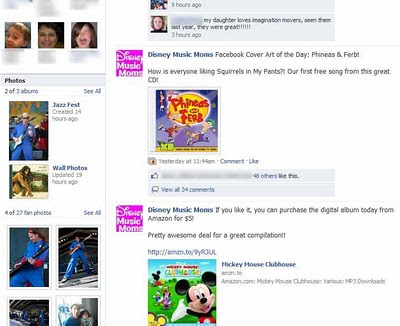
Here are the differences when logged onto Facebook outside US and behind a US proxy. This is the DMM page when logged on using a non-US IP address.
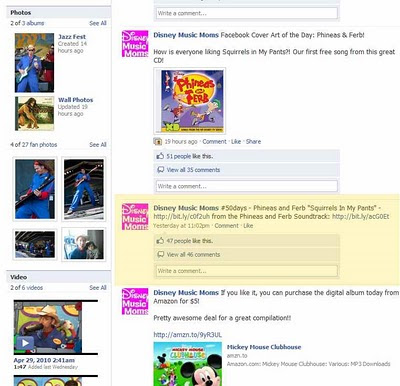
Here is the same page 2 minutes later when hosted through a US-based proxy server ... note the additional highligted section in yellow that contains the link to the actual mp3 download.
But most obvious is the page status when proxied and when not ... one shows the link whilst the other is blank
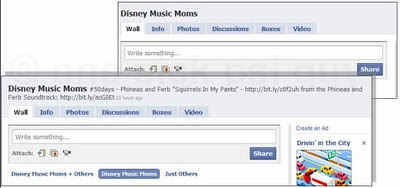
Wished DMM would have informed fans earlier instead of the hundreds of posts demanding to know where the links are. (Oh ... and don't bother with the links/addresses shown, they expire after 23 hours)
Scratch this paragraph ... they fixed it after finding out the problems.
Here are the differences when logged onto Facebook outside US and behind a US proxy. This is the DMM page when logged on using a non-US IP address.

Here is the same page 2 minutes later when hosted through a US-based proxy server ... note the additional highligted section in yellow that contains the link to the actual mp3 download.

But most obvious is the page status when proxied and when not ... one shows the link whilst the other is blank

Wished DMM would have informed fans earlier instead of the hundreds of posts demanding to know where the links are. (Oh ... and don't bother with the links/addresses shown, they expire after 23 hours)
I'm getting bored ... bored of Feseni :(
Another year but the same old story .... but most obvious is the extreme drop in quality and showmanship this year. Of the 8 teams competing this year, none actually stood out as outstanding or showed any improvement.
Excluding the winning group, here are the most glaring problems in each of them.
Excluding the winning group, here are the most glaring problems in each of them.
Faking a nude pic (or I'm bored and started photoshopping)
 Last year someone on FB decided to upload a whole bunch of pics altered using the web service yearbookyourself. The results were less than spectacular but hilarious nonetheless. So few days back when I was bored out of my mind and sick of reading journals, I thought about seeing if a manual effort would produce better results.
My goal - create an incriminating picture about someone based on easily available pictures .... so whats in fashion now other than having your nude pics circulated online?
Step 1: obtain a nude picture to be "sacrificed". Google is SOOOOOOOO good to me here and in the end I decided on the male human form .... don't get any ideas though. I chose male so that more of the *ahem* nude body could be shown. If I went female, then basically I am limited to doing from shoulder up and that wasn't much of a challenge to alter the pic :P
Shown below is the pic I chose, cut (sic) to where I deemed necessary to show modification ... you want the rest of the pic, go Google it or search some porn site you know of (yeah, stop lying about it). Reason - clear body outline so that I can isolate it.

Step 2: Person to "incriminate". Obviously I had to choose a picture that more or less matched the body angle of my sacrificial pic so as I had less work to do - once again Google images to the rescue!! The chosen one here is pretty obvious (the group he comes from rhymes with boogerlay ... btw his pics are really amazing for someone over 40!) and it seemed to fit quite well, heck even the hair was cut off roughly at the same spot!
Problem here is that it was taken intentionally overexposed for a print ad which means one of the pics will have to be adjusted to match (kinda like how yearbookpics changes everything to black and white to simplify matching skin tones)

Step 3: I'm too lazy to document each step. Basically isolate body, cut of head and save as layer. Isolate head, cut of body and set as secondary layer. Merge, blend, resize, desaturate, brighten, feather smudge+smudge+smudge and several artsy-fartsy filters to hide any imperfections and here's the result. Not too bad for less than 10 minutes of digital manipulation .... a definite improvement over the effort from yearbook pics. If I wanted to, I probably could have replaced the background to the original but you get the general idea.
 Kinda makes you wonder how many images you see in media are actually real and not touched-up
NOTE: This example and the people chosen/pics used were NOT intended to defame or insult the individuals. All content was obtained through Google images and used without permissions from respective parties. Apologies to all affected.
..... Show/hide full post (note partial nudity involved!)
Waaaay overproduced and over the top = EPIC FAIL
Although I laud their efforts to promote relief to the Haiti nation, but me thinks (sic) that the new version of "We Are The World 25" pales in comparison by a VERY VERY large margin with the original eventhough it is 25 years old.
Yes there are countless of celebrities in the song but not all can sing (why the heck is that Bieber kid in there? was he even born when MJ recorded the first version? why does he get top billing?). The song has been heavily auto-tuned and produced with what seems like an overdoes of reverb and echo ... turn it up loud enough on headphones and it borders on getting nauseating with the phasing. And whats with the need to mention "Academy award" director the the music video? The final video looks like it could possibly have been produced using Windows Movie Maker with the footage taken off CNN or some other news broadcast.
Good points? The new sections and rap bits added a welcome update to the song. Inserting post recordings of MJ singing bits of the song is also a cool tribute to the King of Pop but other than that the song is pretty forgettable. Too bad .... look for some other avenue to donate rather than purchasing this piss-poor rendition of a MJ classic.
Yes there are countless of celebrities in the song but not all can sing (why the heck is that Bieber kid in there? was he even born when MJ recorded the first version? why does he get top billing?). The song has been heavily auto-tuned and produced with what seems like an overdoes of reverb and echo ... turn it up loud enough on headphones and it borders on getting nauseating with the phasing. And whats with the need to mention "Academy award" director the the music video? The final video looks like it could possibly have been produced using Windows Movie Maker with the footage taken off CNN or some other news broadcast.
Good points? The new sections and rap bits added a welcome update to the song. Inserting post recordings of MJ singing bits of the song is also a cool tribute to the King of Pop but other than that the song is pretty forgettable. Too bad .... look for some other avenue to donate rather than purchasing this piss-poor rendition of a MJ classic.
Whoa ... flashback on MyTown!
Was spring cleaning my room when I collected and sorted through the CDs that were stashed and forgotten and happened upon this oldie album.

I grabbed it from a bargain bin somewhere for 2 ringgit - I think - and totally forgotten about it (it was still shrink wrapped!!). I guess two of the members are more popular now in the band The Script but it was waaaay back then that they were an Irish export called MyTown and had a string of hits "Now That I've Found You", "Body Bumpin" and "Party All Night".
Since playing the CD, I've been rummaging through my harddrives (yes multiple drives - 8 internal/external drives totalling over 2 terabytes) and finally found the saved webcast of their stopover to Malaysia in which they visited KLCC and had a online webchat. I think the whole event was sponsored by Maxis.Net when they were promoting their dial-up services. Since I couldn't find the videos any where, I'm uploading them here just for the fun of it .... yeah, the MTV is totally lost and isn't even available on YouTube?!? Well, it is now :D
Even rarer is this next edited clip of them playing the song live for the webcast. Can't believe I actually downloaded the clip over a 33.6kbps dialup modem - the full video clip weighs in at 60MB!

I grabbed it from a bargain bin somewhere for 2 ringgit - I think - and totally forgotten about it (it was still shrink wrapped!!). I guess two of the members are more popular now in the band The Script but it was waaaay back then that they were an Irish export called MyTown and had a string of hits "Now That I've Found You", "Body Bumpin" and "Party All Night".
Since playing the CD, I've been rummaging through my harddrives (yes multiple drives - 8 internal/external drives totalling over 2 terabytes) and finally found the saved webcast of their stopover to Malaysia in which they visited KLCC and had a online webchat. I think the whole event was sponsored by Maxis.Net when they were promoting their dial-up services. Since I couldn't find the videos any where, I'm uploading them here just for the fun of it .... yeah, the MTV is totally lost and isn't even available on YouTube?!? Well, it is now :D
Even rarer is this next edited clip of them playing the song live for the webcast. Can't believe I actually downloaded the clip over a 33.6kbps dialup modem - the full video clip weighs in at 60MB!
10 years and this is all?
Posted about this back on 11th October 2008 and today this popped up in my inbox at Hotmail. After 12 years of using Hotmail, a mass generated email thanks is all I get .... *sheesh* ... how bout some free hardware? software?


What was supposed to be this year's song(s)?
Been asked this before ... my selection and arrangement for the songs for Feseni 2010 is previewed below :P
Astro B.yond ... good or bad?
UPDATED 01/01/2010
One call and 8 days later then TA-DAAH! The Astro B.yond box is installed. What is involved - new set-top box/decoder, new external dish/LNB, remote control and HDMI cable all in a pretty basic blue box.
 Going around the forums, the most common questions about the B.yond package I've seen are as follows (and answered the best to my knowledge)
How much do I need to pay to get B.yond?
That should answer the majority of the questions floating around cyberspace now ... now back to figuring out if there's any way of hacking the STB
One call and 8 days later then TA-DAAH! The Astro B.yond box is installed. What is involved - new set-top box/decoder, new external dish/LNB, remote control and HDMI cable all in a pretty basic blue box.
 Going around the forums, the most common questions about the B.yond package I've seen are as follows (and answered the best to my knowledge)
How much do I need to pay to get B.yond?
If you are a current customer, nothing. Installation is free AS LONG AS YOU SURRENDER YOUR OLD EQUIPMENT (this includes STB, remote and smartcard ... items DO NOT need to be in working order but you must have a running Astro account). Installers should accept ANY decoder/remote + gold smartcard even if you are not using the decoder (i.e. you bought another one to replace non-working one, etc)How long do I need to wait?
If you are not a Astro customer/ex-customer you need to pay standard installation fees of RM80 to install dish, cabling and setting up of the STB to TV. The charges here are similar to the old decoder. If you wish to keep your old equipment the same charges apply (but note that your old gold smartcard will also be deactivated upon the activation of your HD smartcard)
Depending on area and availability, anywhere between 5 to 25 days. The installers I've seen and asked have mentioned they are installing at a rate of around 70 to 100 sets per day. Each set has to be activated at Astro and linked to your account (i.e. program smartcard) before they are assigned to the installers.What do I need to view B.yond?
Any TV will work with the decoder - 3 video outputs are provided in increasing quality (composite, component and HDMI) along with one analog stereo outputs (RCA) and one digital output (RCA). Best video quality at HD resolution can only be provided through HDMI cables. Composite will be limited to 500 lines resolution (approx) and component a maximum of 720 lines. HDMI will support up to 1080 lines of resolution. The majority of LCD/Plasma TVs locally sold already support the requirements for the B.yond STB.What resolution is Astro B.yond broadcasting at?
According to website specs, the channels broadcasting now are in 1080i but the STB can downsample to 720p and 576p/i for compatibility reasons.The B.yond remote conflicts/interferes with my TV/amp/hifi remote. What do I do?
Unfortunately there is no easy answer to this. Unlike the old STBs, the current Pace STB does not seem to have an alternative channel for the remote (or at least one that is documented for public knowledge).Do I need a widescreen TV to view?
No but it will be better. HD content will be broadcast in widescreen 16:9 ratio. Using a standard 4:3 TV will allow you to choose between a Pan-and-scan option (i.e. zoom in and cut off the sides) or letterbox mode (black bars top and below content). On a widescreen TV the options are different - 4:3 broadcasts can either be stretched to fill the screen (i.e. fat people) or pillarboxed (black bars on left and right of content). All Astro content is in PAL format 50Hz.Which is better - 720p or 1080i?
Uhm .... depends on your TV set and how sensitive your eyesight is, but majority of viewers may not be able to tell the difference (especially on smaller screens or longer distances). People claim that 720p results in smoother images with less stair-stepping since each image projected is "whole" whilst others claim that 1080 gives you such a higher resolution that the stepping is unnoticable plus you get the extra detail. Basically, if you have a LCD/Plasma TV not older than 5-8 years, any signal going in is already going to be de-interlaced before it can be shown on the panel (yes ... all flat panels are progressive displays and cannot work with interlaced signals).Can I just buy the decoder/subscribe HD channels/terminate after installation?
So, my suggestion is, if your display supports it, to use the 1080i signal as broadcast to your STB and let the TV do the deinterlacing for itself. If you are using the 720p output signal, your display may have to recompose the image again (stretch or shrink to fit) and then deinterlace AGAIN before displaying which may affect resoultion. Personal experience says that the 720p signal gets deteriorated quite a bit on my set (which is 1080p capable) until I see jaggies on curves and lines.
No. The decoder is bundled as a package WITH the channels. You need a minimum 1 year subscription else a RM500 penalty will be charged for early termination of HD services. Subscription is RM20 per month + your standard Astro monthly package subscription rates. The RM20 does NOT give you access to all the HD channels. Access will follow your normal subscription package (e.g. your normal Astro subscription does not have sports package so you will not get the HD sport channels even if you pay RM20). My charges for HD channels only begin in April eventhough I've installed it for two weeks in December but your mileage may vary depending on how loyal a customer you are and is up to Astro's discretion to offer.Can I transfer the card to another B.yond decoder?
Once your 1 year contract is up, you are free to terminate the HD service and choose to retain normal Astro subscription to standard definition channels. The decoder will continue to function as it is.
No. The card/STB are linked together and will not work on other B.yond decoders.On an old TV set, can I use S-video/SCART connection instead?
Purchase a Component to S-video/SCART converter (around RM15) to connect to your set. Else use composite connections but at (noticeable) reduced qualityWhat connections are available on the STB?
As listed on the images below .... (click for larger image in a new window/tab)What are the USB ports for?


PVR (personal video recorder) functions introduced later (as announced on website) and possibly firmware upgrades. The decoder is NOT designed to function as a media center (i.e. WDTV) but will only playback content recorded by the unit itself. You need a storage device (thumbdrive, external HDD) to record content onto.Can I share the recorded content later?
No. All content recorded on your decoder will be DRM locked to your subscription (and possibly the decoder) and can only be played back on the same unit/account.What is my PIN code for parental settings/installation settings?
Its in the manual .... but since you're here the default value is 0000.What is the network/ethernet port for?
IPTV/Network functions introduced later.Is there any difference to the content?
Uhm ... not really. HD channels will be in proper widescreen ratio (no more fat people la!) and in 5.1 surround sound (requires external amplifier/decoder) and standard content remains the same. Some channels will eventually have exclusive HD content not available on the standard channels. HD broadcasts are currently delayed by 1 hour except for sports HD channels which have a nominal delay (few seconds due to broadcast delays around the world etc.) There are only 4 channels now (fifth introduced in January) and rumours of an additional 5 channels later in the year. The 2010 World Cup will be one of the highlights of the HD offerings as they will be in widescreen 5.1 surround.Is/Are the HD content/channels censored/broadcast in original aspect ratio?
Content on ALL ASTRO CHANNELS will remain censored and cut to remove "questionable" and "offending" content. This means all swear words (F***, B**CH, S*IT, B*TT, A*S etc) will be silenced if done locally (if from original source you hear the normal beep). All kissing, nude (partial or full), sexual, illicit, boob-y and breast-y content will be removed. If you wish to view things like this, go online or switch to the cartoon channels!! (yup ... words like ASS , BUTT and SHIT as well as kissing scenes are OK on Disney and Cartoon Network but not on any adult channels - go figure THAT out)Will all channels be HD? Are the normal channels improved in quality?
Film content will be in widescreen but NOT in original aspect ratio (OAR). They will be zoom pan-and-scan but not to the extremes of 4:3 crop. For example, the current Indiana Jones marathons are actually filmed in 2.35:1 ratios and start off correctly. Immediately after the credits, the picture zooms in slowly to fill the 16:9 screen (but still at HD resolutions). Since the start of B.yond broadcasts NONE of the movies on HBO-HD have been broadcast in OAR. This is beyond (sic) the control of ASTRO because this cropping is done at the source.
No. Only specific channels will be broadcast in HD format whilst remaining existing channels remain exactly the same. Those channels won't look any better than what you have now ... well, maybe slightly better because of higher transmission rates thus making it less blocky/pixelatedHow do I remember/What are the HD channel numbers?
Easy ... change the middle number to either 3 or 7. For example HBO is 411 so HBO-HD is on 431. NatGeo and History is on 553 and 555 so their HD corresponding channels are 573 and 575 respectively.Can I split the output signal to two TVs?
Possibly (haven't tried this yet) by using the multiple outputs provided. HDMI connections to the main TV whilst an extended component cable run to a secondary TV but both sets will display the same channel.Can I split the incoming signal (from dish) to two decoders (e.g. one B.yond and the other standard)
No. One thing is the LNB on the new dish is vastly different and could be incompatible with the older STBs. The other is the new B.yond decoder is highly sensitive and is said to not work well with any cable splitter which degrades the signal quality (note quality and not strength) Having more than one B.yond STB linked to a single dish might result in no receptionAny disadvantages to changing to the new decoder?
Based on experience, the new STB works best with an external amplifier (or at least a hifi set) as the standard outputs are extremely low. If you are watching the current Astro STB with a volume level on your TV at 20 then the new STB will need a volume level of around 85 to be equal (personal comparison). Maximum output resolution is at 1080i but majority of households with LCD TVs can support this or at least the 720p resolution. No pay TV company broadcasts in 1080p.What about advantages (other than HD)?
If you are exchanging a Astro.MAX decoder, note that you will lose the function of the dual decoder (i.e. you can't record one channel whilst watching another) because the STB only has one tuner built in
The new STB response is much faster than any other existing standard STB in all aspects. Also, load times are very very much quicker - especially on channels that are NOT on your subscription (old decoders forced you to wait for the "This channel is not in your subscription" message before allowing you to proceed, this STB doesn't) The old "GUIDE" option is now replaced with the "TV GUIDE" that now also shows a mini preview window whilst still allowing you to browse through the channels.What equipment is B.yond using?
Seems that the B.yond STB is a adaptation of the Pace DS830 box found here and here or the US variant found here but localised specifically for Astro to have USB ports ×2. The actual STB used has the model code DS830NA and uses NDS encryption for content distribution. The unit is manufactured/assembled in Malaysia.Will I be able to receive Digital FTA TV with the B.yond decoder?The external dish is slightly larger but no details have been provided/obtained thus far. It is angled at a different position during installation (towards MEASAT3) and has a better signal rate and thus should reduce rain fade-outs (my current signal strength is hovering above 85% at 100% quality levels, before it was 61%).
From whatever information obtainable, it seems the STB runs on a RISC cpu with Linux as its operating system (cold start shows a BOOTING message on STB LCD panel). The manual lists GPL and LGPL licensing by Pace as part of the software contained within the box. More details possibly obtainable here.

No. Current digital TV trial broadcasts are running on DVB-T whilst Astro runs on (possibly but unconfirmed) DVB-S which is entirely incompatible. To view FTA channels you need a separate decoder and high-gain digital antenna to receive those channels.What does the aspect ratio button do (on the remote)?
A future function to allow switch between widescreen/standard ratios and possibly between stretch/pan-and-scan modes depending on your TV.What does the Back button do (on the remote)?
Several functions - move back between setup menus to a earlier one, close the language/subtitle panel and channel swap (swaps between the two most recent channels viewed)What does the AV button do (on the remote)?
If programmed to your TV (See your manual), the AV button allows you to cycle through the AV inputs on your TV set. If not programmed, the button does nothing.What does the FAV button do?
Allows you to select (limited) channels and group them as your favourites. By default, the channels are already grouped as movies, sports, news etc. This allows you to only view the schedule for your favourite channels instead of all your subscribed channels.What happened to the INFO button?
The INFO button on the B.yond box only shows the content of the current channel displayed. To get something similar to the INFO function on the old STB, used the arrow keys around the OK button to call up the "programme banner" then use the arrow keys to move between channels and time slots. The programme banner dissapears after a set amount of time (available in the settings options) To view details of a particular program on a timeslot, press the INFO button. Another way to view the schedule is to use the TV button.How do I return back to the program I was watching?
Press the blue B.yond button anywhere to return to the last viewed channel.What does the APP/.@ button do?
Who knows ....Do you work for Astro?
Nope I do not, but answering the same questions to neighbours made me think to write this up for fun and also as a service to those searching Google for answers...... Show/hide questions about B.yond
That should answer the majority of the questions floating around cyberspace now ... now back to figuring out if there's any way of hacking the STB
Subscribe to:
Posts (Atom)